Polybius Square Decoder and Encoder
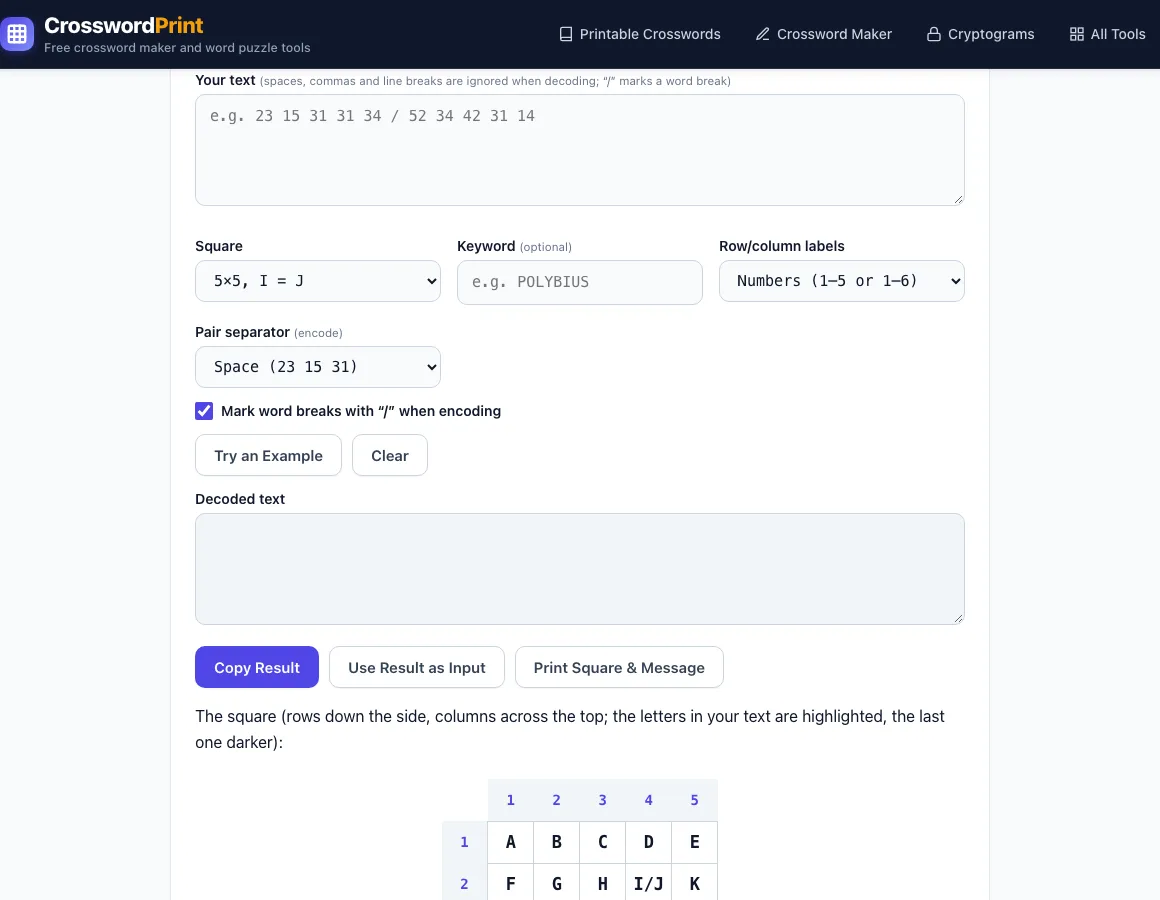
Paste the number pairs to read the message, or switch to Encode to turn text into row and column numbers. The square below lights up as you type.
The square (rows down the side, columns across the top; the letters in your text are highlighted, the last one darker):
Polybius Square
Name: ____________________ Date: ______________
Coded message:
Decoded message:
Made with Crossword Print · crosswordprint.com/polybius-square/
The Polybius Square Decoder turns a Polybius square message back into readable text. Each letter is written as two digits: a row number, then a column number. So 23 means row 2, column 3, which is H. Paste the digit pairs into the input, choose the square you used, and read the decoded text. Cells with your letters light up in the square under the tool.
The tool is free, runs entirely in your browser, and needs no sign-up. Nothing you type is sent to a server. It also works in reverse as a Polybius square encoder, and it includes a tap code translator for the knocking version that prisoners of war used.
How to use the Polybius Square Decoder
- Leave the mode on Decode (numbers → text), which is the default.
- Open the Square menu and choose the grid that matches your message: 5×5, I = J (the default), 5×5, C = K, 6×6, A–Z and 0–9, or Tap code (5×5, K = C, dots).
- Optional: type a word into Keyword (up to 40 characters) if the sender mixed the square with one. Keyword is disabled for tap code.
- Set Row/column labels to match the message: Numbers (1–5 or 1–6), Letters ADFGX / ADFGVX, or Custom… (exactly 5 or 6 different characters).
- Paste the coded message into the input. Spaces, commas, dashes, dots, newlines and brackets are all accepted. Use “/” or “|” to mark word breaks.
- Read the decoded text and check the highlighted cells in the square drawn below the tool. If a note says the shared cell decodes as I (or C), read it as J (or K) wherever the word needs it.
- Click Try an Example to see a sample run, or Clear to start over.
Click Copy Result to copy the decoded text. Use Result as Input moves the result into the input box and flips the mode, which is useful for checking your work by encoding it again. Print Square & Message prints the empty square, the coded message and the decoded message on one page.
The squares and messages you print can be used in class or in products you sell, such as escape-room printables or KDP activity books.
What is the Polybius square
The Polybius square is a simple substitution cipher that places the alphabet in a 5×5 grid. Each letter is replaced by two digits: the row number, then the column number. A is 11 (row 1, column 1), B is 12, and Z is 55. A 25-cell grid cannot hold 26 letters, so the standard version merges I and J into one cell.
The Greek historian Polybius described a grid-based signalling method in the 2nd century BC, using torches to show positions. The 6×6 version holds all 26 letters and the digits 0 to 9 in 36 cells, so no letters need to share. The square’s security comes from keeping the arrangement or keyword secret, not from the grid itself.
How to decode a Polybius square cipher
To decode by hand, split the message into pairs of digits, because every letter is exactly two digits. Read the first digit as the row and the second as the column, then find that cell in the grid. Repeat for each pair, and mark word breaks where the sender left gaps or slashes.
If a keyword was used, rebuild the square first. Write the keyword’s letters across the top-left, dropping any repeats, then fill the rest of the alphabet in order. Read the grid the same way: always the row first, then the column.
Take the message 23 15 31 31 34. Row 2, column 3 is H. Row 1, column 5 is E. Row 3, column 1 is L, and row 3, column 4 is O. The message reads HELLO. A slash between pairs marks a new word, so 23 15 31 31 34 / 52 34 42 31 14 reads HELLO WORLD.
How to encode with a Polybius square by hand
Find each letter in the grid and write its row number, then its column number. With the standard square, WORLD becomes 52 34 42 31 14. Leave a space between pairs and a slash between words so the reader can split them. In tap code the same numbers are knocked instead: two knocks, a pause, then three knocks spell H.
Frequently asked questions
Is the Polybius square decoder free?
Yes. The tool is free, runs entirely in your browser, and needs no sign-up. Nothing you type is sent to a server.
Why are I and J in the same square?
A 5×5 grid has 25 cells, but the alphabet has 26 letters, so one cell must hold two letters. The standard tool places I and J together and decodes that cell as I. Where the word needs a J, read it that way. Choose “5×5, C = K” for the other common version, or “6×6, A–Z and 0–9” to give every letter its own cell.
What is tap code and how does it work?
Tap code uses a fixed 5×5 square: ABCDE / FGHIJ / LMNOP / QRSTU / VWXYZ, with K written as C. Each letter is sent as two groups of taps, the row first and then the column. Prisoners of war used it to tap messages through walls. In this tool, select the tap code option and enter dots, with a space between the row and column groups, three spaces between letters, and “/” between words.
What happens if my message has an odd number of digits?
The decoder shows a clear error saying that every letter needs a row and a column. This usually means a digit was dropped or a pair was split. Check the original message and paste it again. If a character is not a valid label, the error names it so you can find it.
Can I use a keyword with the Polybius square?
Yes, on the standard squares. Type up to 40 characters into Keyword. Its letters come first, with duplicates removed, and the rest of the alphabet follows. With the keyword POLYBIUS, “Meet at noon” encodes as 42 32 32 51 / 24 51 / 43 12 12 43. Keyword is not available for tap code.
Does this tool decode ADFGVX messages?
It handles the Polybius square step only. The German ADFGX and ADFGVX ciphers from World War I start from a square with those letters as row and column labels, and this tool supports those labels. It does not perform the full ADFGVX cipher, which has additional steps.
Is the Polybius square printout free for commercial use?
Yes. The square and the coded message you print are royalty-free for personal, classroom and commercial use, including Etsy printables, KDP books, Teachers Pay Teachers and print-on-demand products. No credit is required. You may not copy the tool itself to run a competing service.
Related tools
- Caesar Cipher: Use this for messages shifted by a fixed number of letters.
- Atbash Cipher: Use this for messages where A is swapped with Z, B with Y, and so on.
- Pigpen Cipher: Use this for symbols drawn from a grid pattern.
- Morse Code Translator: Use this for messages made of dots and dashes.
- Letter to Number Converter: Use this for simple A=1, B=2 number codes.
- Cipher Identifier: Use this when you are not sure which cipher a message uses.
- Playfair Cipher: use it for a keyword 5×5 square that codes letters in pairs.
- Rail Fence Cipher: use it for a zigzag transposition code.
About the Polybius square
The Polybius square, also known as the Polybius checkerboard, is a device invented by the ancient Greeks Cleoxenus and Democleitus, and made famous by the historian and scholar Polybius. The device is used for fractionating plaintext characters so that they can be represented by a smaller set of symbols, which is useful for telegraphy, steganography, and cryptography. The device was originally used for fire signalling, allowing for the coded transmission of any message, not just a finite number of predetermined options as was the convention before.
Basic form
According to Polybius' Histories, the device was invented by Cleoxenus and Democleitus, and further developed by Polybius himself. The device partitioned the alphabet into five tablets with five letters each (except for the last one with only four). There are no surviving tablets from antiquity. Letters are represented by two numbers from one to five, allowing the representation of 25 characters using only 5 numeric symbols.
The original square used the Greek alphabet laid out as follows:
Modern Greek still uses that same alphabet, as do implementations of the Polybius square in that language.
With the Latin alphabet, this is the typical form:
This alphabet, and this latter form of the Polybius square, is used when implementing the square in other Western European languages such as English, Spanish, French, German, Italian, Portuguese, and Dutch.
Text adapted from the Wikipedia article “Polybius square” (revision 1347185430, 2026-04-05), authors, licensed under CC BY-SA 4.0. Shortened: some sections and paragraphs were left out, and reference markers, images and templates were removed; wording is otherwise unchanged. This text remains available under the same licence.