Letters into Numbers Converter
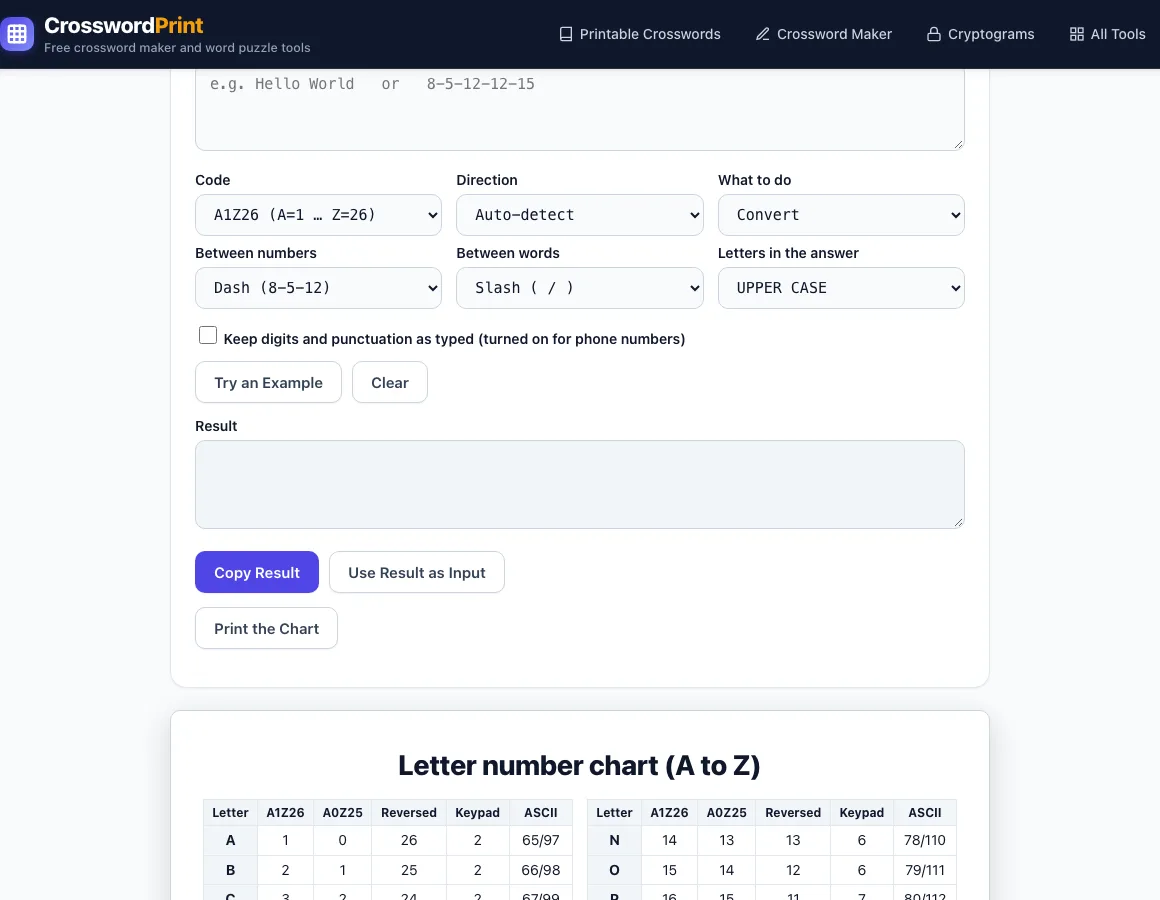
Type letters to get numbers, or numbers to get letters back. Pick the code (A=1…Z=26, phone keypad, ASCII) and the answer appears as you type.
Letter number chart (A to Z)
| Letter | A1Z26 | A0Z25 | Reversed | Keypad | ASCII |
|---|---|---|---|---|---|
| A | 1 | 0 | 26 | 2 | 65/97 |
| B | 2 | 1 | 25 | 2 | 66/98 |
| C | 3 | 2 | 24 | 2 | 67/99 |
| D | 4 | 3 | 23 | 3 | 68/100 |
| E | 5 | 4 | 22 | 3 | 69/101 |
| F | 6 | 5 | 21 | 3 | 70/102 |
| G | 7 | 6 | 20 | 4 | 71/103 |
| H | 8 | 7 | 19 | 4 | 72/104 |
| I | 9 | 8 | 18 | 4 | 73/105 |
| J | 10 | 9 | 17 | 5 | 74/106 |
| K | 11 | 10 | 16 | 5 | 75/107 |
| L | 12 | 11 | 15 | 5 | 76/108 |
| M | 13 | 12 | 14 | 6 | 77/109 |
| Letter | A1Z26 | A0Z25 | Reversed | Keypad | ASCII |
|---|---|---|---|---|---|
| N | 14 | 13 | 13 | 6 | 78/110 |
| O | 15 | 14 | 12 | 6 | 79/111 |
| P | 16 | 15 | 11 | 7 | 80/112 |
| Q | 17 | 16 | 10 | 7 | 81/113 |
| R | 18 | 17 | 9 | 7 | 82/114 |
| S | 19 | 18 | 8 | 7 | 83/115 |
| T | 20 | 19 | 7 | 8 | 84/116 |
| U | 21 | 20 | 6 | 8 | 85/117 |
| V | 22 | 21 | 5 | 8 | 86/118 |
| W | 23 | 22 | 4 | 9 | 87/119 |
| X | 24 | 23 | 3 | 9 | 88/120 |
| Y | 25 | 24 | 2 | 9 | 89/121 |
| Z | 26 | 25 | 1 | 9 | 90/122 |
The Letters into Numbers Converter is a letter to number converter that turns letters into numbers and numbers back into letters. Type text into the box and the result updates as you type. It uses the A1Z26 code by default, where A is 1 and Z is 26, and it also supports the phone keypad, ASCII codes, and several other letter-number systems. The tool is free, needs no sign-up, and runs entirely in your browser, so nothing you type is sent to a server. It also works as a letter number cipher decoder: convert or change letters into numbers, get the translation of a number code back into the alphabet, or turn letters into phone numbers. You can also add up the letter values of a word or name, which is useful for puzzles, escape rooms, secret codes, and word-sum games.
How to use the Letter to Number Converter
- Click the text box and type letters or numbers. The result updates live.
- Check the Direction. Leave it on Auto-detect and the tool encodes text that contains letters and decodes text that contains only digits. You can also pick Letters to numbers or Numbers to letters yourself.
- Choose a Code: A1Z26 (the default), A0Z25, Reversed, Phone keypad, or ASCII codes.
- Set Between numbers to Dash, Space, Comma, or None.
- Set Between words to Slash ( / ), Double space, New line, or Single space.
- When decoding, pick Letters in the answer: UPPER or lower.
- Under What to do, choose Convert for a straight conversion, or Add up the values to get each word’s total, the grand total, and a reduced-to-one-digit value.
- Click Copy Result to copy the answer, or Use Result as Input to send it back into the box and check that it decodes to your original text.
Shortcuts and extras: Try an Example rotates through six examples and sets the code for you. Clear empties the box. The A–Z chart lists each letter’s value in every code, and Print the Chart prints it cleanly. Choosing the Phone keypad code turns on Keep digits and punctuation as typed.
What number is each letter of the alphabet?
In the standard A1Z26 system, A is 1, B is 2, and so on up to Z at 26. Each number is simply the letter’s position in the alphabet. Other codes shift the starting point: A0Z25 starts at 0, so A is 0 and Z is 25, and Reversed counts from the end, so A is 26 and Z is 1. ASCII uses computer character codes instead, where A is 65 and a is 97, so upper and lower case have different values. For example, “Hello World” in A1Z26 becomes 8-5-12-12-15 / 23-15-18-12-4.
How do you convert letters to numbers and back?
Encoding replaces each letter with its code, and decoding reverses that step using the same code. Each number maps to one letter, so the code you choose must match the one used to write the numbers. Decoding 8-27-0-5 gives H??E, because 27 and 0 are outside the A1Z26 range and become question marks. The tool also lists those values in its message so you can see what went wrong.
Separators tell you where each number ends. Without them, a string such as 12 could mean L or AB. Use dashes or spaces between numbers, and use slashes, double spaces, or new lines between words. Decoding tolerates leading zeros, brackets, and common punctuation.
What is the A1Z26 cipher?
A1Z26 is the simplest letter-number cipher. Each letter is replaced by its position in the alphabet, with A as 1 and Z as 26. It appears often in puzzles, escape rooms, and secret codes that children make for each other. It offers no real security, because the pattern is easy to spot and anyone who knows the rule can reverse it in seconds. There is no key to protect the message.
How do you turn letters into phone numbers using a keypad?
Choose the Phone keypad code to map each letter to the number on its phone key: ABC=2, DEF=3, GHI=4, JKL=5, MNO=6, PQRS=7, TUV=8, and WXYZ=9. Several letters share each key, so one digit can stand for several letters. For example, 1-800-FLOWERS becomes 1-800-3569377.
When you decode keypad digits, the tool lists the possible letters for each digit. For up to four digits, it shows every letter combination, with a maximum of 200. It also lists real English words that type as those digits, up to 60, with common words first. The digits 228 produce ACT, BAT, CAT, and others.
How do you add up the letters of a word or name?
Add up the value of each letter in the word, using a code such as A1Z26. Choose Add up the values under What to do, and the tool gives you a total for each word, a grand total, and a reduced-to-one-digit value. For example, “Love” is 12 + 15 + 22 + 5 = 54, “me” is 13 + 5 = 18, the total is 72, and reducing 72 by adding its digits gives 9.
This method is the basis of word-sum puzzles and of gematria-style number games, where each letter’s value is added to get a number for a word. The result changes with the code you choose, so a keypad sum will differ from an A1Z26 sum for the same word.
Frequently asked questions
Is the Letter to Number Converter free?
Yes. The tool is free, requires no sign-up, and runs in your browser. Nothing you type is sent to a server.
What is the difference between A1Z26 and A0Z25?
Both codes count the alphabet in order, but A0Z25 starts at 0 instead of 1. So every letter has a value one lower in A0Z25 than in A1Z26. Check which code your puzzle uses before decoding.
Why does my decoded text show question marks?
A question mark means the number is outside the range of the code you chose. In A1Z26, for example, 27 and 0 have no matching letter. Check the code setting, or see whether the number was meant to be a different value.
Does the tool handle spaces, punctuation, and capital letters?
When decoding, the tool accepts dashes, commas, periods, semicolons, colons, underscores, spaces, and brackets. You can choose UPPER or lower case for the letters in the answer. The ASCII code encodes every character, including digits and punctuation, using codes 32 to 126.
Where can I find all the letter values in one place?
The A–Z chart on the page lists every letter with its A1Z26, A0Z25, Reversed, keypad, and ASCII upper and lower case values. Click Print the Chart to print it.
Related tools
- Number to Words Converter — Use it when you need a number written out in words, such as for a check or a school assignment.
- Caesar Cipher — Use it when you want a code that shifts each letter by a set number of places.
- Atbash Cipher — Use it when you want a code that swaps each letter with its mirror in the alphabet, so A becomes Z.
- Polybius Square — Use it when you want to encode letters as pairs of row and column numbers.
- Morse Code Translator — Use it when you want to turn letters into dots and dashes.
- Cipher Identifier — Use it when you have a coded message and want to work out which cipher was used.
- Pigpen Cipher — Use it when you want letters shown as symbols based on grid shapes.
- Codeword Solver — Use it when you are stuck on a codeword puzzle and need help filling in the missing letters.
About substitution ciphers
In cryptography, a substitution cipher is a method of encrypting that creates the ciphertext (its output) by replacing units of the plaintext (its input) in a defined manner, with the help of a key; the "units" may be single letters (the most common), pairs of letters, triplets of letters, mixtures of the above, and so forth. The receiver deciphers the text by performing the inverse substitution process to extract the original message.
Substitution ciphers can be compared with transposition ciphers. In a transposition cipher, the units of the plaintext are rearranged in a different and usually quite complex order, but the units themselves are left unchanged. By contrast, in a substitution cipher, the units of the plaintext are retained in the same sequence in the ciphertext, but the units themselves are altered.
There are a number of different types of substitution cipher. If the cipher operates on single letters, it is termed a simple substitution cipher; a cipher that operates on larger groups of letters is termed polygraphic. A monoalphabetic cipher uses fixed substitution over the entire message, whereas a polyalphabetic cipher uses a number of substitutions at different positions in the message, where a unit from the plaintext is mapped to one of several possibilities in the ciphertext and vice versa.
The first ever published description of how to crack simple substitution ciphers was given by Al-Kindi in A Manuscript on Deciphering Cryptographic Messages written around 850 AD. The method he described is now known as frequency analysis.
Text adapted from the Wikipedia article “Substitution cipher” (revision 1362628480, 2026-07-05), authors, licensed under CC BY-SA 4.0. Shortened: some sections and paragraphs were left out, and reference markers, images and templates were removed; wording is otherwise unchanged. This text remains available under the same licence.